- Integrations
Audit XML File: Your Step Toward Efficient the NRA Reporting
Learn how the audit XML file ensures transparency and accuracy in reporting to the Bulgarian National Revenue Agency for e-commerce businesses.
 Take a NAP Team
In the dynamic world of e-commerce, compliance with regulatory requirements is key to the successful operation of your business. The audit XML file can be your reliable tool in this process, ensuring transparency and accuracy in reporting to the National Revenue Agency (the NRA).
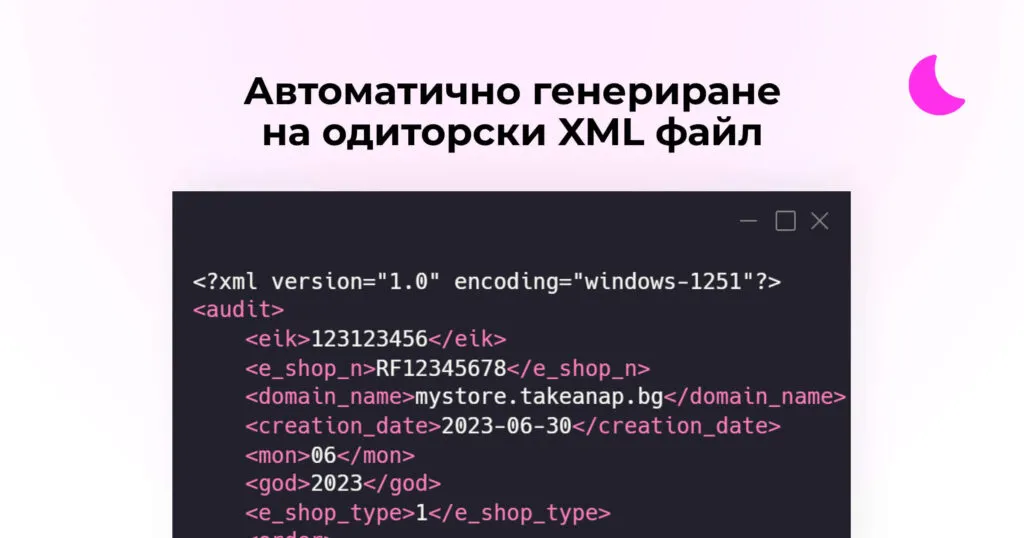
The audit file can be used when your store reports through the Alternative Regime for Registering and Reporting Sales.
The Alternative Regime allows online stores to report their sales to the NRA without using physical fiscal devices. This is possible when customers pay online with a credit or debit card. Online stores can use software like Take a NAP, and then send the mandatory information about their sales.
For every sale made online, stores must issue an electronic document, according to Ordinance № Н–18, to customers. Take a NAP does this automatically.
You can NOT issue physical cash register receipts from a cash register when you take advantage of the Alternative Regime and your store does not accept cash payments. As a convenient substitute, you can integrate payments through Postal Money Transfer - a service offered by Econt, Speedy, etc. This way, your customers can pay cash on delivery, but you don’t need a cash register.

For each reporting period, stores provide the NRA with a file in XML format with data on all their sales. This makes the sales and reporting process easier and more efficient for online store owners and accountants.
What are XML files and XSD schemas anyway?
XML is a type of language that helps computers understand and exchange information easily. Imagine you want to tell another computer how many sales you had during the day. XML allows you to organize this information in such a way that the other computer easily understands it.
The XSD schema is like a rulebook that tells you what the information in the XML file should look like. For example, the XSD schema might say that the date should be in “day/month/year” format and the sales amount should be a number.
When it comes to reporting to the National Revenue Agency (the NRA) in Bulgaria, you submit a special XML file with information about your sales. The XSD schema helps the NRA verify that the file you submitted is written correctly and contains all the necessary information.
What is an audit XML file?
The audit XML file is a standardized document that is generated and submitted electronically to the NRA every month. It includes detailed information about all transactions made during the relevant period and helps the agency track the financial activity of your store.
The XML file is like one big form that is filled with your sales data, and the XSD schema performs a check that makes sure you filled out the form correctly before sending it to the NRA.
Submitting an accurate and timely audit XML file not only complies with legal requirements but also improves your corporate image. It shows regulators and your partners that you are running a responsible and transparent business.
Practical tips for preparing and submitting an audit XML file
-
Carefully check the data: Before submitting the XML file, make sure all data is accurate and up-to-date.
-
Use reliable software: Choose software that automates the process of generating and submitting the XML file, saving you time and effort.
-
Observe deadlines: The XML file must be submitted between the 1st and 15th of the month following the month to which it relates. Don’t miss these deadlines to avoid penalties from the NRA.
You can easily delegate to Take a NAP and your accountant all the steps listed above. Our software will ensure everything is accurate with your sales data, and your accountant will review the audit file and submit it to the NRA.
Through the Alternative Regime, you minimize the need for communication between you and accounting, while saving your accountant a lot of time and hassle.
With proper planning and attention to detail, the audit XML file can become your reliable tool for successful reporting to the NRA, which in turn will contribute to the stability and growth of your digital business.
How and where is the audit file submitted?
The standardized audit file is submitted through the specialized electronic service of the NRA, which is accessible after authentication with a qualified electronic signature (QES). Sounds complicated? Don’t worry, because your accountant already has this access.
the NRA offers an XSD schema and sample XML file that you can use as example materials when creating your audit XML files.
The technical requirements for XML files are defined in Ordinance №Н-18/2006, which includes specifications for the file structure and the information it must contain.
It is important to note that in 2021 a change was made to the XSD schema for submitting a standardized audit file. For your convenience, Take a NAP monitors such changes and updates its software as soon as possible.
By combining technical knowledge, the right software, and regular communication with your accountants and legal advisors, you can optimize the reporting process and facilitate your relationship with the National Revenue Agency.
Okay, great, how do I get started?
Is this a “How do I connect this, dude?” situation? No problem, below we’ve briefly written what you need to do.
The first step is to contact your accountant and tell them that you want your online store to report to the NRA through the Alternative Regime for Registering and Reporting Sales. They will explain what is needed and whether it is possible given the current operations in your business.
The second step is for your store to receive a unique number from the NRA that will associate the audit files and electronic documents with it.
The unique number is obtained after submitting a declaration for a new online store in the electronic services portal of the NRA. You need a QES (qualified electronic signature) for that. Your accountant can handle all of this.
If you use Take a NAP, the third step is to connect your store with our software. Currently, our officially supported platforms are Shopify and WooCommerce.
By registering with Take a NAP, you also get a 14-day free trial. You can start right now from here:

Try Now
Try Now
Finally, you need to configure your store in Take a NAP the way you want. We have tried to provide as many configuration options as possible to cover every interpretation of Ordinance № Н–18. We recommend that your accountant help you.
Configuration is easy, fast, and Take a NAP gives you practical tips at every step of the process.
Ready for Audit Files Without the Headaches?
Save hours of manual work every month. Take a NAP automatically generates audit files and sends digital receipts to your customers — fully compliant with Ordinance Н-18.

already trust us